
B8MY Login allows players to access their online betting accounts using a username, password, Google or Telegram. The interface includes Remember and Forgot Password features to simplify account access and recovery. At B8MY, players in Myanmar can choose their preferred sign-in method, manage account information and access available gaming services through a convenient login process.
How to complete B8MY Login using a username and password
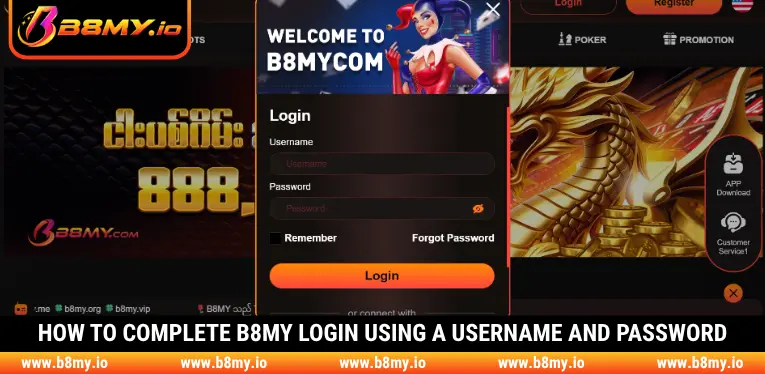
Players can complete B8MY Login by opening the website, selecting Login and entering their registered credentials. B8MY displays the login form directly on the homepage, allowing users to access their accounts without navigating to a separate page.
Step 1 – Open the website and select Login
Visit the B8MY website using a computer or smartphone browser. Find the Login button in the upper-right corner of the homepage, directly beside Register. Click the red-outlined button to open the login window, which displays Username, Password and additional account access options.
Step 2 – Enter your username and password
In the B8MY Login form, enter your registered Username and corresponding Password. Click the eye icon beside the password field to check the characters you have entered. Make sure capitalization, spelling and spacing are correct, as mismatched credentials can prevent successful authentication.
Step 3 – Confirm Login to access your account
After checking your details, click the orange Login button below the form. B8MY will verify the submitted credentials and grant access when they are valid. If an error appears, review your username, password and internet connection before attempting to sign in again.
Alternative account login methods available at B8MY
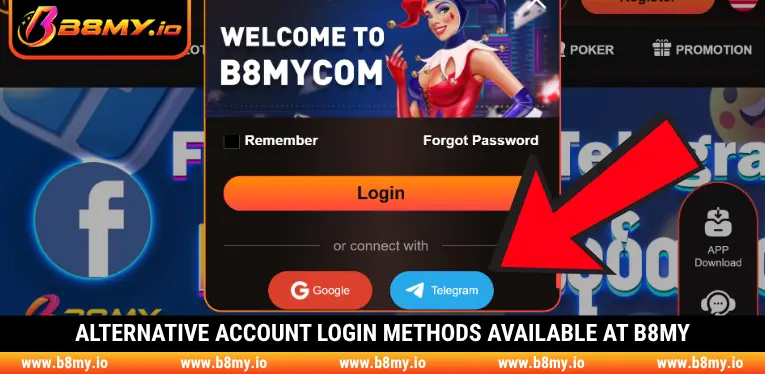
Besides standard credentials, B8MY Login offers Google and Telegram authentication options. Both buttons appear below the “or connect with” label in the login window. Players can select the method associated with their account and follow the relevant verification instructions.
| Login method | How to access your account |
| Username and Password | Enter your registered credentials and click Login. |
| Select Google and complete authentication using your linked account. | |
| Telegram | Choose Telegram and follow the required sign-in confirmation steps. |
Helpful features available in the B8MY Login interface
The B8MY login window includes practical features that simplify account access and help players manage common difficulties. Alongside Username and Password, users can enable Remember, reveal password characters or select Forgot Password when they cannot recall their credentials.
Remember helps maintain your login session
The Remember checkbox appears below the Password field and can be enabled with a single click. Depending on the supported login settings, it helps retain account information or the authentication session. Players should only enable this feature on personal devices and avoid using it on shared computers.
Password visibility for checking login details
An eye icon beside the Password field allows users to show or hide the characters they enter. During B8MY Login, this feature helps identify typing mistakes before submitting credentials. After checking the password, switch back to hidden mode to prevent others from seeing sensitive information.
How to recover a forgotten account password
Players who cannot remember their passwords can select Forgot Password beside the Remember option. B8MY places this feature directly inside the login window for convenient account recovery. The exact verification process depends on the instructions displayed by the system.
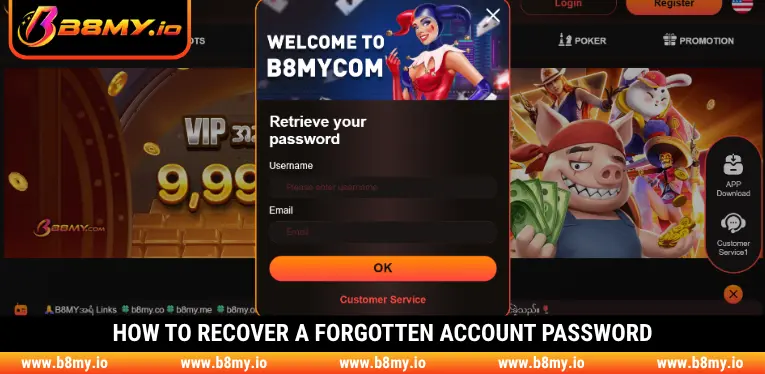
- Step 1 – Open the login window: Visit the website and click Login. Find Forgot Password below the password field.
- Step 2 – Select Forgot Password: Click the recovery option to begin the process. Follow the instructions displayed on the screen.
- Step 3 – Provide account information: Enter the requested verification details. Only use information associated with your own account.
- Step 4 – Reset your password: Complete verification and create a new password when prompted. Choose a strong password that differs from the previous one.
- Step 5 – Sign in again: Return to B8MY Login and enter your updated credentials. Contact Live Chat if account access remains unsuccessful.
Common B8MY login errors and how to fix them
Players may experience B8MY Login errors caused by incorrect credentials, unstable connections or incomplete authentication. B8MY recommends checking the possible cause before retrying to avoid repeated failed attempts and unnecessary account access difficulties.
| Common login issue | Recommended solution |
| Incorrect username | Check the spelling and remove accidental spaces. |
| Wrong password | Review entered characters or use Forgot Password. |
| Login window does not open | Check your connection, refresh the website or try another browser. |
| Google connection fails | Verify your Google account and repeat authentication. |
| Telegram authentication fails | Check your connection and retry with the correct account. |
| Unable to access the account | Review the error message and contact Live Chat if necessary. |
Important security precautions when logging in to B8MY
Protecting personal information is essential when using B8MY Login, especially for accounts containing balances and transaction records. B8MY encourages players to use trusted devices, verify the official website and safeguard their authentication credentials.
- Keep passwords private: Never disclose passwords or OTPs to anyone. Customer support does not require these credentials to provide assistance.
- Verify the official website: Enter login details only on the legitimate platform. Avoid suspicious links or unfamiliar pages requesting account information.
- Avoid public devices: Do not enable Remember on shared computers. Always sign out completely after using another person’s device.
- Secure connected accounts: Enable available security features on Google or Telegram. Carefully review unexpected authentication requests.
- Monitor account activity: Regularly check balances and transaction records after signing in. Report suspicious changes through the official support channel.
What to check after successfully logging in
After completing B8MY Login, players should review their account status, balance and relevant notifications before participating in games. B8MY organizes Slots, Fish, Live, Sports and Poker within its main navigation menu, providing convenient access to available entertainment categories.
Players should also check transaction histories, current promotional conditions and any changes to their personal information. For users in Myanmar, verifying payment details and account records helps reduce errors during deposits and withdrawals. Avoid initiating transactions when unusual account activity remains unresolved.
Contact customer support if you cannot log in
If B8MY Login remains unsuccessful after checking your credentials, assistance is available through Live Chat. On the B8MY website, select the Customer Service icon on the right side of the screen, directly below App Download. A separate chat window will open automatically for submitting your issue.
Customer support operates 24/7 and assists with login difficulties, password recovery and account verification. Players should describe the error message, when it occurred and the steps already taken. Never share passwords or OTPs during support conversations, even when additional information is requested.
Conclusion
B8MY Login provides convenient account access through Username, Password, Google and Telegram, supported by Remember and Forgot Password features. Players in Myanmar should verify their credentials, protect personal information and use trusted devices to reduce security risks. If authentication fails or account access becomes unavailable, contact the 24/7 Live Chat support team at B8MY for assistance.

Thinzar Wint Kyaw သည် B8my Myanmar ၏ တရားဝင် အမျိုးသမီး Brand Ambassador နှင့် အဓိက အကြောင်းအရာ သုံးသပ်သူ ဖြစ်ပါသည်။ မြန်မာနိုင်ငံ၏ ထင်ရှားသော သရုပ်ဆောင်နှင့် မော်ဒယ်တစ်ဦးအနေဖြင့် သူမသည် ကစားသမားများအတွက် ယုံကြည်စိတ်ချရသော ဘောလုံးပွဲစဉ် ခန့်မှန်းချက်များ၊ တိုက်ရိုက်ကာစီနိုနှင့် စလော့ဂိမ်းများ၏ အကောင်းဆုံးဗျူဟာများကို မျှဝေပေးပါသည်။ KPay နှင့် WavePay တို့မှတစ်ဆင့် လျင်မြန်စိတ်ချရသော ငွေသွင်းငွေထုတ် လမ်းညွှန်ချက်များနှင့်အတူ Thinzar Wint Kyaw သည် လုံခြုံပြီး တာဝန်သိသော ကစားနည်းပတ်ဝန်းကျင်ကို ထိန်းသိမ်းရန် ကတိပြုထားပါသည်။