
Contact B8MY – How to Access 24/7 Live Chat and Get Support
Contact B8MY allows players to reach customer support through Live Chat directly on the website. Whether facing login problems, payment concerns or gaming-related issues, users can open a dedicated chat window by selecting Customer Service. B8MY provides 24/7 assistance, helping players in Myanmar report problems, receive guidance and follow up on requests through one official communication channel.
The official customer support channel at B8MY
B8MY provides Live Chat as its only official customer support channel, accessible directly from the website. Players can find the Customer Service icon on the right side of the screen and select it to open a separate chat window. The interface includes an automated greeting, a message field and basic messaging functions for submitting support requests.
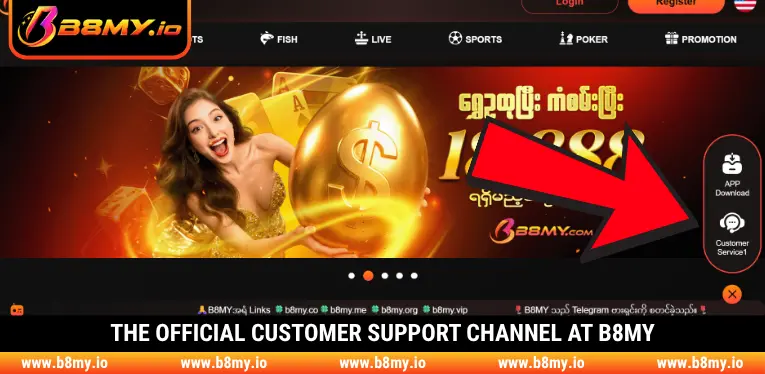
Through Contact B8MY, users can seek assistance with account access, payments, game-related problems and general service questions. Keeping customer communication within one dedicated channel makes it easier to submit requests, provide additional information and communicate with the support team without switching between different platforms.
When to Contact B8MY Customer Support
Players may encounter login issues, payment delays or technical errors while using the platform. Through Contact B8MY, users can report these problems and receive assistance from the B8MY support team via Live Chat.
- Login issues: Get help with forgotten passwords, account access or verification errors. Include the error message for easier troubleshooting.
- Deposit problems: Report payments that have not appeared in your balance. Provide the transaction amount, time and reference number.
- Withdrawal delays: Request assistance with pending or rejected withdrawals. Share relevant transaction details to help verify the status.
- Game errors: Report loading failures, connection problems or unusual game behavior. Attach a screenshot when necessary.
- Promotion inquiries: Clarify bonus eligibility, wagering requirements or missing rewards. Mention the promotion name for accurate assistance.
How to use Live Chat through Contact B8MY
Players can access Contact B8MY by selecting Customer Service on the right side of the website. B8MY then opens a separate Live Chat window where users can describe their issues and request assistance in three simple steps.
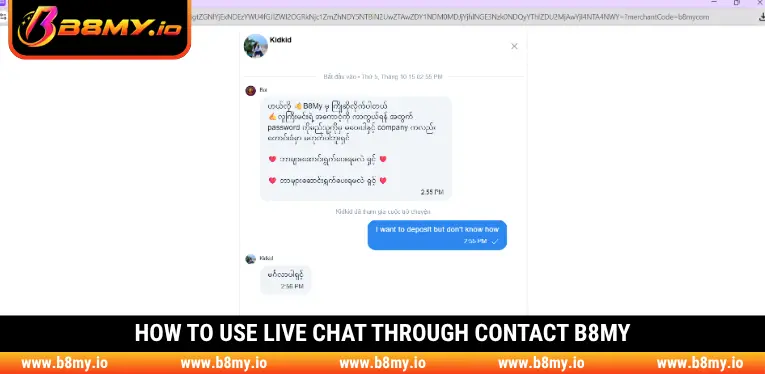
Step 1 – Open the website and select Customer Service
Visit the B8MY website using a computer or smartphone browser. Find the Customer Service icon on the right side of the homepage, directly below App Download. Click the headset and chat bubble icon to access the support function without navigating to another section.
Step 2 – Access the dedicated Live Chat window
After selecting Customer Service, a separate Live Chat window opens automatically. The B8MY system displays a welcome message from a Bot, along with a conversation area and message field. Players can enter their questions or attach screenshots when additional details are needed.
Step 3 – Describe the issue and submit a support request
Enter a clear description of the problem and click Send to submit your request. Through Contact B8MY, players can provide their username, transaction details or relevant screenshots for verification. Follow the support team’s instructions, but never share passwords, OTPs or other sensitive login information.
Information to prepare before contacting customer support
Preparing relevant details before using Contact B8MY helps players explain their issues clearly and avoid unnecessary delays. B8MY may require different information depending on whether the request involves account access, payment verification or technical errors.
| Required information | Purpose |
| Account username | Identifies the account requiring assistance. |
| Issue description | Explains the problem, error message or affected feature. |
| Time of occurrence | Helps identify when the issue or transaction took place. |
| Transaction reference | Supports deposit or withdrawal verification. |
| Transaction amount | Helps match payment information with account records. |
| Screenshot | Provides visual evidence of errors or unusual transaction statuses. |
24/7 customer support and request processing times at B8MY
B8MY provides 24/7 customer support through Live Chat, allowing players to report issues at any time. General questions about accounts, games and platform features can be addressed directly, although resolution times may vary depending on the complexity of each request.
Through Contact B8MY, players can also request assistance with pending deposits or withdrawals, which may take up to 24 hours to process. Keeping transaction references and payment details available helps with verification, while unresolved cases can be followed up through Live Chat.
Important security precautions when using Contact B8MY
Protecting personal information is essential when requesting customer support. B8MY provides Live Chat directly on its website, helping players avoid unofficial contact channels. Following basic security practices can reduce the risks of account theft and information exposure.
- Protect login credentials: Never share passwords, OTPs or verification codes. Keep these details private, even during support conversations.
- Use the official website: Access Live Chat through the Customer Service icon. Avoid suspicious links or messages from unknown accounts.
- Describe issues clearly: Include relevant error messages and the time of occurrence. Accurate details help the support team identify problems.
- Share screenshots safely: Hide sensitive information before uploading images. Screenshots should only show details relevant to the reported issue.
- Keep support records: Save important instructions and transaction references. These details are useful when following up on unresolved requests.
How to follow up on unresolved customer support requests
If an issue remains unresolved, players should check their account or transaction status before contacting support again. Through Contact B8MY, they can provide previous conversation details, explain the remaining problem and submit additional evidence to help the support team continue reviewing the request.
For pending deposits or withdrawals, avoid repeating transactions before confirming their status. B8MY may require up to 24 hours to complete payment-related checks. Players should retain transaction references, review account records and use Live Chat to request updates without creating duplicate transactions.
Conclusion
Contact B8MY provides a direct way to resolve account issues, payment concerns and technical problems through 24/7 Live Chat. Players can open Customer Service, describe their situation and receive assistance without using external communication channels. Deposit and withdrawal cases may take up to 24 hours to process. For secure customer support and reliable guidance, access the official Live Chat directly through B8MY.