
B8MY Withdrawal allows players to cash out funds through e-wallets, bank accounts or cryptocurrency wallets. The process takes place in Personal Center, where users can link a receiving account, check their balance and submit withdrawal requests. B8MY also provides payment management tools, transaction history and 24/7 customer support, helping players in Myanmar monitor their withdrawals and resolve payment-related concerns.
Withdrawal methods and transaction limits at B8MY
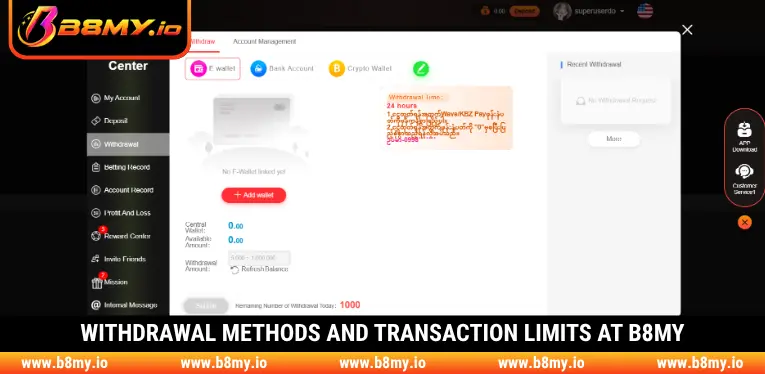
B8MY Withdrawal offers three payment categories: E-wallet, Bank Account and Crypto Wallet. Players must link their preferred receiving account before submitting a withdrawal request. B8MY organizes these options within Personal Center, alongside transaction limits and processing information.
| Withdrawal method | Available options | Required information |
| E-wallet | Wave Pay, KBZ Pay | Account holder’s name and e-wallet number |
| Bank Account | KBZ Bank | Beneficiary name and bank account number |
| Crypto Wallet | USDC BEP20, USDC ERC20, USDT BEP20, USDT BSC, USDT TRC20 | Token, blockchain network and wallet address |
| Displayed limits | 5,000–1,000,000 MMK | Subject to available balance and payment requirements |
| Processing time | Up to 24 hours | Includes cases requiring additional verification |
How to complete B8MY Withdrawal step by step
To begin B8MY Withdrawal, players must log in and open Withdrawal in Personal Center. If no receiving account is linked, Account Management allows users to add one. B8MY keeps account linking, balance checking and withdrawal confirmation within the same interface.
Step 1 – Open Personal Center and select Withdrawal
Log in to B8MY, access Personal Center and select Withdrawal from the left-hand menu. The system displays E-wallet, Bank Account and Crypto Wallet options, alongside Central Wallet, Available Amount and Withdrawal Amount. Check your available balance and choose the preferred receiving method.
Step 2 – Link your preferred receiving account
If no payment account is linked, select Add Wallet or open Account Management. B8MY allows players to choose an e-wallet, bank account or crypto wallet before entering the required details. Review the account holder’s name, account number or wallet address, then click Submit to save the information.
Step 3 – Enter the amount and confirm your withdrawal
Return to B8MY Withdrawal and select your successfully linked receiving account. Enter the desired amount in Withdrawal Amount, ensuring it does not exceed Available Amount or the applicable limits. Verify the payment details and click Submit to send your request for processing.
How to link e-wallets, bank accounts and crypto wallets
In Account Management, B8MY separates receiving accounts into three categories, each requiring different payment details. Players should select the correct method and verify their information before saving it, as mismatched details may cause withdrawal failures or additional checks.
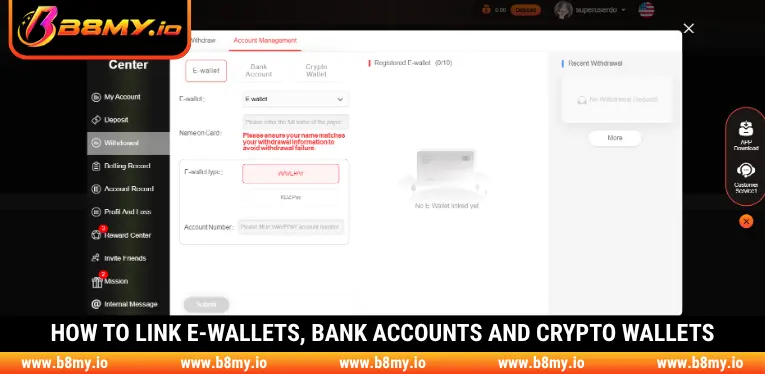
- Wave Pay e-wallet: Select E-wallet, choose Wave Pay and enter the account holder’s name and wallet number. The receiving details must be accurate and legally owned.
- KBZ Pay e-wallet: Choose KBZ Pay under E-wallet when available, then complete the required fields. Check the registered phone number and account holder’s name before saving.
- KBZ Bank account: Open Bank Account, select KBZ Bank and enter the beneficiary’s name and account number. Matching information helps prevent verification issues.
- Cryptocurrency wallet: Select Crypto Wallet and choose the appropriate token and blockchain network. Enter the receiving address carefully, as transfers to an incorrect network may result in lost funds.
Withdrawal limits and processing times at B8MY
The B8MY Withdrawal interface displays a withdrawal range of 5,000–1,000,000 MMK, alongside Central Wallet and Available Amount. Players can submit requests only when the applicable conditions are met. B8MY also provides Refresh Balance to update account information before submitting transactions.
Withdrawals may take up to 24 hours to process, particularly when additional payment verification is required. Players in Myanmar should check their request status before contacting support. Avoid submitting duplicate withdrawals while a previous transaction remains pending.
Common B8MY Withdrawal errors and solutions
During B8MY Withdrawal, players may encounter problems involving unlinked accounts, incorrect payment details or insufficient balances. B8MY recommends checking the relevant fields before resubmitting requests to avoid unnecessary verification delays.
| Common issue | Recommended solution |
| No receiving account linked | Open Account Management and add a suitable payment method. |
| Account holder’s name does not match | Verify and correct the beneficiary information. |
| Insufficient available balance | Check Available Amount and adjust the withdrawal value. |
| Amount exceeds withdrawal limits | Enter an amount within the displayed range. |
| Incorrect crypto network or address | Verify the token, blockchain network and receiving address. |
| Withdrawal request pending | Check Recent Withdrawal and wait for verification. |
How to check B8MY Withdrawal transaction history
After submitting a B8MY Withdrawal request, players can monitor its status through Recent Withdrawal or Account Record in Personal Center. B8MY provides a Withdrawal Records tab with date and transaction-type filters, allowing users to review previous withdrawal information.
In Withdrawal Records, select Today, Yesterday, 7-Days or a custom date range, then click Search. Available records display Transaction Time, Transaction Amount, Current Balance and Order Reference Number. If No matched data found appears, adjust the search filters before requesting assistance.
Important security precautions for B8MY Withdrawal
Receiving account details must be protected carefully during B8MY Withdrawal, especially when using bank accounts or cryptocurrency wallets. B8MY encourages players to verify payment information, use trusted devices and safeguard authentication credentials to reduce unauthorized access risks.
- Use accounts in your own name: Receiving details must match valid account information. Discrepancies may trigger additional verification.
- Verify blockchain networks: Select the correct token and receiving network for crypto withdrawals. Transfers to incorrect addresses are generally irreversible.
- Check balances and limits: Review Available Amount before entering your withdrawal value. Never request more than the permitted amount.
- Avoid duplicate requests: Wait for confirmation while a withdrawal remains pending. Repeated submissions may complicate transaction verification.
- Protect authentication details: Never share passwords, OTPs or wallet private keys. Customer support does not require these credentials.
Contact support for unresolved withdrawal requests
If a B8MY Withdrawal remains pending or displays an unusual status, players can contact B8MY through Live Chat. Select Customer Service on the right side of the website to open a separate conversation window. The support team accepts requests 24/7.
Prepare the withdrawal amount, receiving method and transaction reference before contacting support. Cases requiring additional verification may take up to 24 hours to resolve. During this period, monitor Withdrawal Records and avoid unnecessary changes to your payment details.
Conclusion
B8MY Withdrawal supports cashing out through e-wallets, bank accounts and cryptocurrency wallets with clear steps for account linking, balance checks and transaction confirmation. Players in Myanmar should verify receiving details, follow withdrawal limits and review payment history to avoid errors. If a transaction is delayed or requires verification, retain the reference number and contact B8MY through 24/7 Live Chat for assistance.

Thinzar Wint Kyaw သည် B8my Myanmar ၏ တရားဝင် အမျိုးသမီး Brand Ambassador နှင့် အဓိက အကြောင်းအရာ သုံးသပ်သူ ဖြစ်ပါသည်။ မြန်မာနိုင်ငံ၏ ထင်ရှားသော သရုပ်ဆောင်နှင့် မော်ဒယ်တစ်ဦးအနေဖြင့် သူမသည် ကစားသမားများအတွက် ယုံကြည်စိတ်ချရသော ဘောလုံးပွဲစဉ် ခန့်မှန်းချက်များ၊ တိုက်ရိုက်ကာစီနိုနှင့် စလော့ဂိမ်းများ၏ အကောင်းဆုံးဗျူဟာများကို မျှဝေပေးပါသည်။ KPay နှင့် WavePay တို့မှတစ်ဆင့် လျင်မြန်စိတ်ချရသော ငွေသွင်းငွေထုတ် လမ်းညွှန်ချက်များနှင့်အတူ Thinzar Wint Kyaw သည် လုံခြုံပြီး တာဝန်သိသော ကစားနည်းပတ်ဝန်းကျင်ကို ထိန်းသိမ်းရန် ကတိပြုထားပါသည်။