
B8MY App allows players to access online gaming services on Android phones and iPhones through dedicated download options. By opening App Download on the website, users can scan the appropriate QR code, follow installation instructions and sign in with their existing accounts. B8MY also provides 24/7 Live Chat assistance for technical issues, helping players in Myanmar enjoy convenient and secure mobile access.
How to download B8MY App on Android devices
The Android version of B8MY App is available through the QR code in the website’s App Download section. Players should select the correct option, verify the download source and follow their device’s installation instructions.
Step 1 – Visit the website and open App Download
Open the B8MY website using Chrome or another compatible Android browser. Tap the App Download icon on the right side of the screen to display two QR codes for iOS Lite-App and Android APP. Select the Android option on the right or scan its code using another device.
Step 2 – Download the Android application
After opening the QR code destination, verify the website address and follow the displayed instructions. If an APK file is provided, select Download and wait for the transfer to finish. B8MY App should only be downloaded from the official source to avoid counterfeit or modified installation files.
Step 3 – Install the app and sign in
Open the downloaded installation file and follow Android’s setup instructions. If permission to install from this source is requested, proceed only after verifying the file and checking for security warnings. Once installation is complete, open the application and sign in with your existing B8MY account.
How to install B8MY App on iPhone and iPad
For Apple devices, B8MY App offers an iOS Lite-App option with a dedicated QR code on the website. When accessed through Safari, the installation page may display instructions in Burmese, including options designed for compatible iOS devices.
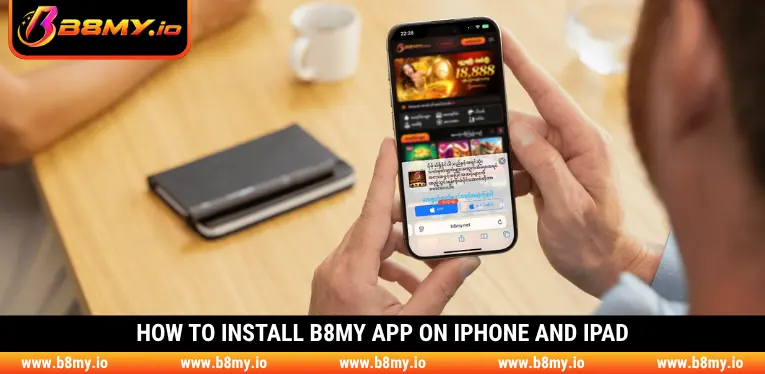
Step 1 – Open Safari and access App Download
On your iPhone or iPad, open Safari and visit the B8MY website. Find the App Download icon on the right side of the screen to access the QR codes. Select iOS Lite-App on the left or scan the code with your iPhone camera when viewing it on another device.
Step 2 – Select the appropriate installation option
After opening the QR code destination, review the instructions and select the APP option for iOS. If Safari offers Add to Home Screen, open the Share menu and choose that option. The exact steps depend on the installation method supported by the download page.
Step 3 – Complete setup and launch the app
Follow the displayed prompts to finish installing the application or adding its icon to your Home Screen. Locate the B8MY App icon and open the login interface. Players can access their existing accounts without registering again, provided their credentials remain valid.
Key features of B8MY App for mobile players
B8MY App provides a mobile-friendly environment for accessing online entertainment and account services. Gaming categories and account functions are organized to help players navigate the platform, review information and complete essential tasks conveniently.
- Multiple gaming categories: Players can access Slots, Fish, Live, Sports and Poker. Each category is organized to make entertainment options easier to locate.
- Account management: Login and account functions allow users to review their personal information. Access requires valid account credentials.
- Transaction tracking: Available deposit, withdrawal and payment history features support account management. Players should verify balances before submitting transactions.
- Promotion access: Users can review promotional offers displayed on the platform. Each promotion has its own eligibility requirements and validity period.
- Online customer support: Customer Service provides access to Live Chat when technical issues occur. The support team accepts requests 24/7.
Common B8MY App download and installation errors
Players may encounter QR code scanning problems, download failures, installation restrictions or device compatibility issues when using B8MY App. B8MY recommends identifying the cause before retrying to avoid installing incorrect versions or ignoring important security warnings.
| Common issue | Detailed solution |
| QR code cannot be scanned | Clean the camera lens, increase the QR code screen’s brightness and hold the phone steady. Reopen App Download if scanning still fails. |
| QR code does not open the download page | Check Wi-Fi or mobile data. Copy the scanned address into Chrome or Safari if the scanner does not redirect automatically. |
| Android APK download fails | Check available storage and network stability. Delete incomplete downloads and retry using the official source. |
| Android blocks installation | Review the warning and verify the APK source. Only allow installation from verified sources, and never bypass malware warnings. |
| App icon does not appear on iPhone | Reopen the page in Safari and review the instructions. If using Add to Home Screen, confirm that the shortcut was added successfully. |
| App crashes immediately | Restart the phone, check available storage and update the operating system. Contact support before reinstalling if the problem continues. |
| Unable to log in | Verify Username, Password and internet connectivity. Use Forgot Password or contact Live Chat if access remains unavailable. |
When should players update B8MY App?
B8MY App may require updates when interface changes, new features or operating system compatibility improvements become available. Players should check announcements on the website and the App Download section to identify the latest available version. Installation files shared through unknown sources should be avoided.
Before updating, ensure a stable internet connection, sufficient storage and access to your login credentials. B8MY encourages players to complete ongoing transactions before changing versions. If the application behaves unexpectedly after an update, Live Chat assistance is available for troubleshooting.
Important security precautions when using the app
Protecting personal information is essential when installing B8MY App, especially for accounts containing balances and transaction histories. Players in Myanmar should verify download sources, manage application permissions and maintain appropriate device security throughout their usage.
- Download from official sources: Use only QR codes provided on the B8MY website. Avoid installation files shared by unknown accounts.
- Protect login credentials: Never disclose usernames, passwords or OTPs. Use strong passwords and avoid saving credentials on shared devices.
- Review app permissions: Grant only permissions necessary for the features being used. Reject requests for unrelated access to personal data.
- Maintain device security: Keep the operating system updated and avoid suspicious software. Never disable security protections simply to complete installation.
- Monitor account activity: Regularly review balances and transaction histories. Change your password and contact support if suspicious activity is detected.
Contact customer support for B8MY App installation issues
If B8MY App cannot be downloaded or installed, players can request assistance through Live Chat. On the B8MY website, select the Customer Service icon on the right side of the interface, below App Download. A separate chat window will open automatically to receive the request.
Customer support operates 24/7 and assists with downloading, account access and installation problems. Players should provide their operating system, phone model and relevant error screenshots when necessary. Passwords, OTPs and sensitive authentication details must never be shared during support conversations.
Conclusion
B8MY App provides Android and iOS download options through QR codes on the official website, helping players choose the correct version for their devices. Before installation, verify the source, follow operating system instructions and protect your login credentials. If download or update issues occur, players in Myanmar can access 24/7 Live Chat assistance. Visit App Download at B8MY to begin a secure installation.

Thinzar Wint Kyaw သည် B8my Myanmar ၏ တရားဝင် အမျိုးသမီး Brand Ambassador နှင့် အဓိက အကြောင်းအရာ သုံးသပ်သူ ဖြစ်ပါသည်။ မြန်မာနိုင်ငံ၏ ထင်ရှားသော သရုပ်ဆောင်နှင့် မော်ဒယ်တစ်ဦးအနေဖြင့် သူမသည် ကစားသမားများအတွက် ယုံကြည်စိတ်ချရသော ဘောလုံးပွဲစဉ် ခန့်မှန်းချက်များ၊ တိုက်ရိုက်ကာစီနိုနှင့် စလော့ဂိမ်းများ၏ အကောင်းဆုံးဗျူဟာများကို မျှဝေပေးပါသည်။ KPay နှင့် WavePay တို့မှတစ်ဆင့် လျင်မြန်စိတ်ချရသော ငွေသွင်းငွေထုတ် လမ်းညွှန်ချက်များနှင့်အတူ Thinzar Wint Kyaw သည် လုံခြုံပြီး တာဝန်သိသော ကစားနည်းပတ်ဝန်းကျင်ကို ထိန်းသိမ်းရန် ကတိပြုထားပါသည်။